
The order comes in on WhatsApp. The money comes in whole.
TalkToCart turns the messages your business already gets into real orders: with their ticket, their VAT and their payment. Customers pay into your own Stripe account: we take no cut of any sale.
- Free forever up to 40 products
- No card required
- Your customer never signs up
- 0% per-order fee
Payments are charged on your own Stripe account. The order money never passes through us.
- No sign-up for your customer
They open a link, pick, and order. No account, no password, no app to install.
- Survives the line going down
Installed as an app, it keeps taking orders offline and syncs on its own when you are back.
- One board, four channels
WhatsApp, Instagram, Facebook and your own shop land on the same list of orders.
Right now the order comes in from four places and none of them talk to each other
A WhatsApp message, an Instagram DM, someone shouting from the counter and a delivery platform that keeps up to 30% of the ticket. In the middle, a notebook and whoever happens to be free.
Without TalkToCart
- Up to 30% of each order goes to the delivery platform
- Orders written by hand, with the prices you remember at the time
- “Are you open?” and “how long will it take?”, answered by hand over and over
- Your customers belong to the platform, not to you
With TalkToCart
- The full amount lands in your Stripe account, minus Stripe's own fee
- Every order arrives priced, with VAT, extras and pick-up or delivery
- You set your opening hours and delivery radius once, and the shop applies them
- The contact list is yours, and you can write to it again
Three steps, and the first one takes an afternoon
- STEP 1
Put your menu in
Products with photo, price, VAT rate and extras — no onion, extra cheese, large size. Categories, recommended items and stock. Up to 40 products on the free plan.
- STEP 2
Connect where they already write to you
WhatsApp, Instagram and Facebook. Your menu becomes a button menu inside the chat: start an order, see my orders, opening hours and shop information.
- STEP 3
Charge and prepare
The order drops onto the board, the customer pays with a Stripe link and on each status change you can write back to them on the same channel they ordered from.
Every order in its column, from “received” to “handed over”
Move an order and, if you want, the customer finds out. The board carries the twelve statuses a counter actually needs — including on hold, ready for pick-up, out for delivery and returned.
- Pick-up at the counter or delivery, with a radius in km or a country list
- A message to the customer when you tick it: “preparing”, “ready to pick up”
- Price, per-product VAT and extras fixed at the moment of the order
- Sales, orders and conversations charted by day, week or month
Your menu, inside the conversation
WhatsApp, Instagram and Facebook messages land in one inbox — several accounts included. And the customer does not have to write out what they want: they press buttons.
- Auto-replies when a message contains a keyword: “menu”, “hours”, “where are you”
- A different reply for someone writing to you for the first time
- A contact list that stays yours, with their order history
- The chat menu and its buttons are in Spanish for now, whatever language you sell in
Hi! Do you do takeaway orders?
Start an order
A shop of your own at yourbusiness.talktocart.com
The same menu, as a page you can put on a sign, a sticker on the door or your Instagram bio. You can tie it to your opening hours: outside them it shows the products but takes no orders.
- Opening hours, weekly rest days and bank holidays, in your own timezone
- Per-product VAT rates and prices with or without tax included
- Ask for a phone or an email only if you actually need it
- Send your catalogue to Facebook and Instagram shops, or pull it back
It keeps working when the line goes down
Install it as an app on the tablet at the counter. Take orders and add products with no connection: what you did is queued and syncs by itself the moment the line is back.
- Customers order from their own phone while they wait, without queueing
- Up to three staff accounts with their own permissions on the Pro plan
- Several shops under one owner: five on Pro, useful for a second site
A flat monthly price. Never a cut of your sales.
The only money taken out of an order is Stripe's own card fee, which you pay Stripe directly. Sell for €3,000 or for €30,000: the plan costs the same.
Free
0 €/month
- Shops1
- Users1
- Products40
- Connections1
- WhatsAppNo
- Automations0
- SupportEmail
Basic
19,99 €/month14-day trial
- Shops1
- Users1
- ProductsUnlimited
- Connections4
- WhatsAppYes
- Automations2
- SupportWhatsApp and email
- Most popular
Pro
39,99 €/month
- Shops5
- Users3
- ProductsUnlimited
- Connections8
- WhatsAppYes
- Automations8
- SupportWhatsApp and email
Custom
Let's talk
- ShopsYour call
- UsersYour call
- ProductsUnlimited
- ConnectionsYour call
- WhatsAppYes
- AutomationsYour call
- SupportA named person
Prices without VAT. Cancel whenever you like, from the panel itself.
See the four plans row by rowWhat people ask before signing up
Do you take a commission on each order?
No. Payments are charged on your own Stripe account, so the money never passes through TalkToCart. The only deduction is Stripe's card fee, which you pay to Stripe under your own terms.
Does my customer have to sign up?
No. They open the link to your shop, pick what they want and order. You decide whether to ask for a phone number or an email — or for neither.
What do I need for WhatsApp?
A WhatsApp Business account connected from the panel, and a paid plan — WhatsApp is not part of the free one. Instagram and Facebook work on every plan.
And if the internet goes down mid-service?
Installed as an app, the panel keeps taking orders and creating products offline. The pending operations are queued and replayed on their own when the connection returns.
I have two sites. Does that work?
Yes. The Pro plan covers up to five shops under the same owner, each with its own menu, hours and orders, and up to three staff accounts with their own permissions.
Can I take my data with me?
Yes, and it matters: the contact list, the order history and the catalogue are yours. The catalogue can also be pushed to your Facebook and Instagram shops.
Selling from a counter, written down
What we learn building this, with numbers and no filler: commissions, menus, opening hours and messages that turn into orders.
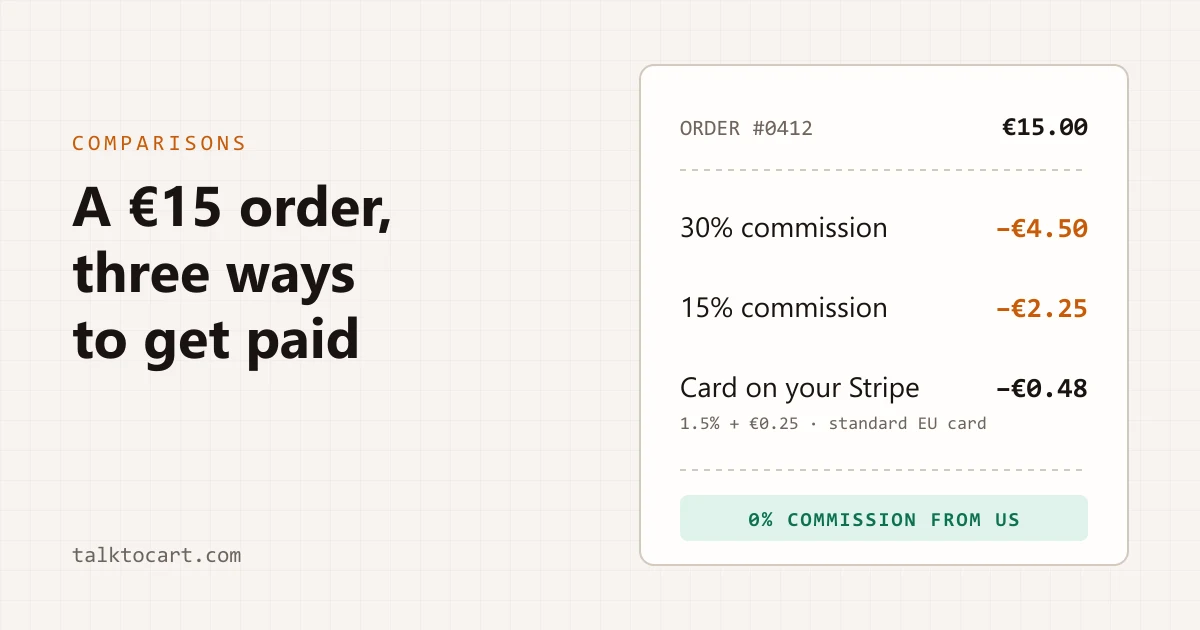 Comparisons
What a delivery platform really costs you
How much Uber Eats keeps from each order according to its own published rates, what it costs to take payment in your own Stripe account, and what the platform gives you that your own shop won't.5 min read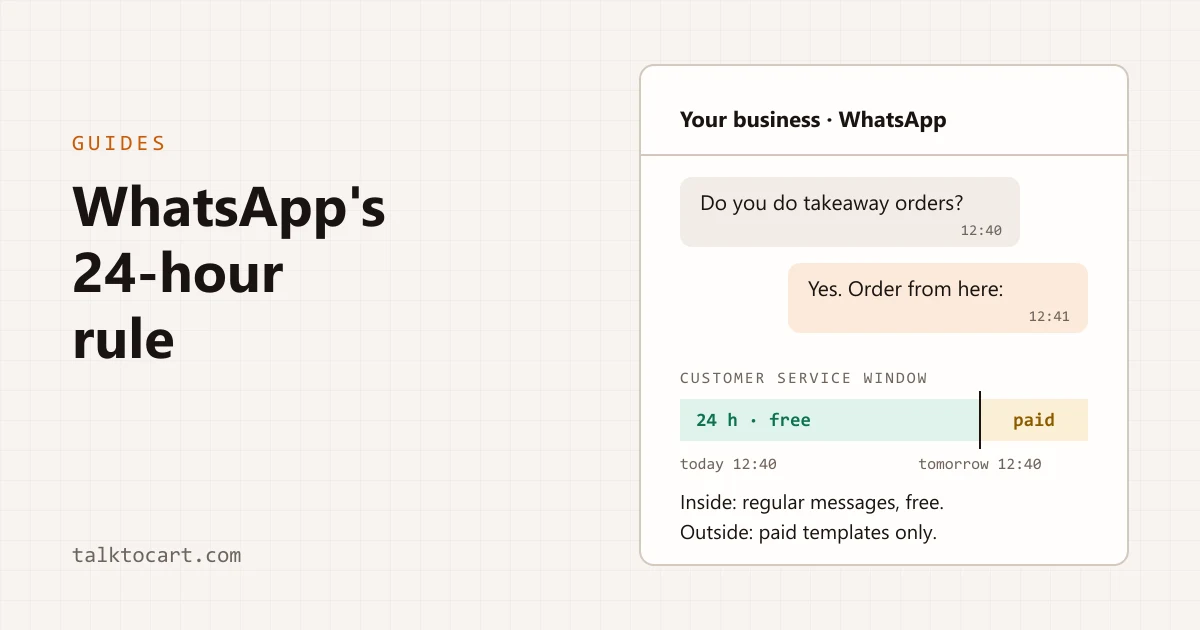 Guides
WhatsApp orders: the 24-hour rule that decides what you can send
What a business can send on WhatsApp and when, what each message has cost since July 2025, and how a takeaway order fits inside that window.4 min read
Open your shop tonight, after closing
The free plan takes 40 products and does not ask for a card. If it does not fit your counter, you will know in an afternoon.